
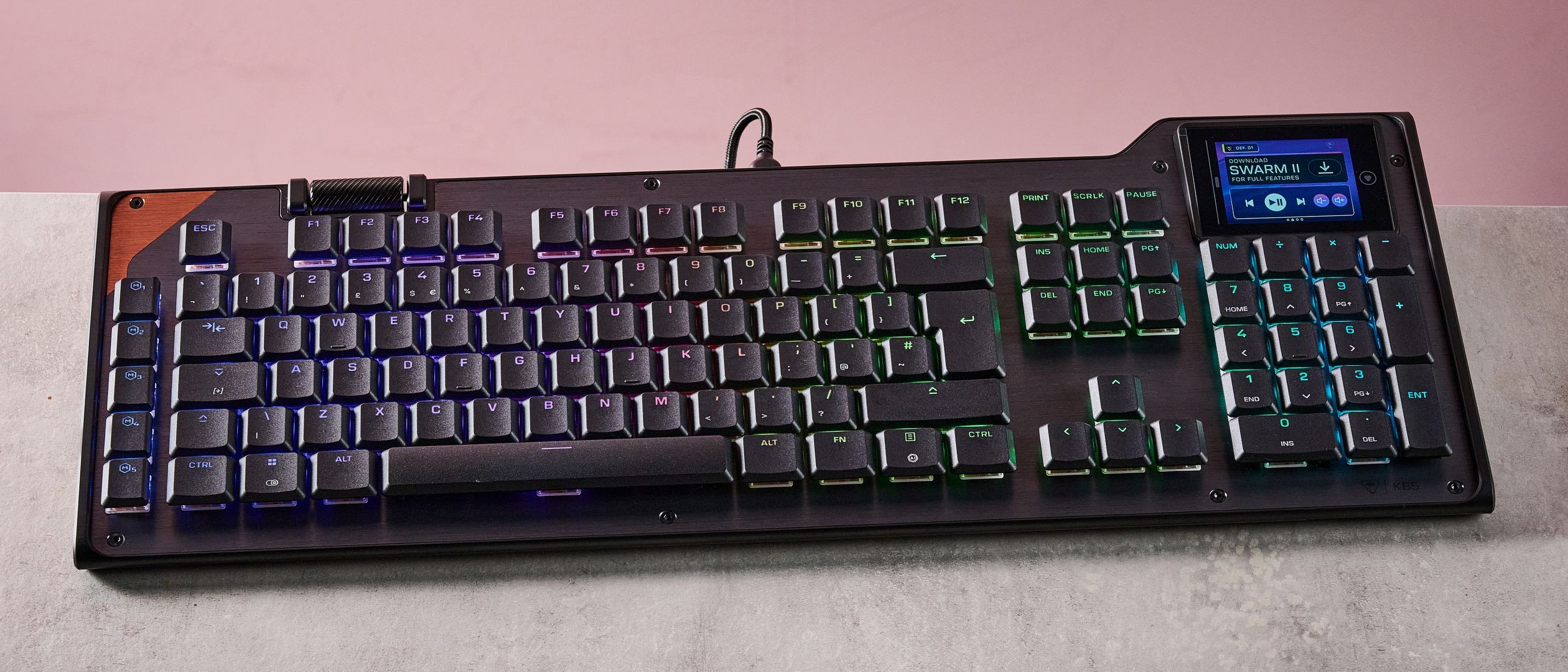
The Turtle Beach Command Series KB5 costs $149.99 and is a full-sized wired keyboard equipped with an interactive touchscreen. While it offers a substantial layout and a notable display feature, it does not include wireless capabilities found in more expensive models like the Razer BlackWidow V4 Pro. The KB5 is currently available in one colorway and includes a braided USB cable, a removable wrist rest, and additional WASD keys with a different texture.
The keyboard has ultra-low profile keycaps that are easy to glide across. Yet the switches demand a relatively firm press to register. The damping of the switches can feel satisfying. Users with a lighter touch may find their taps don’t always register. This is more disruptive during typing than while gaming. The tactile feedback is clear. But it requires consistent force.
Keyboard Design and Ergonomics
Despite the low profile of the keycaps, the overall size of the KB5 is quite expansive. Its width can be a drawback when using a mouse, as the board can interfere with swiping movements during intense gaming sessions. The wrist rest, made of inexpensive plastic, does not provide a plush feel but does offer ergonomic contours that can improve comfort. However, it is attached mechanically rather than magnetically, which is not the case on pricier models.
The primary highlight of the KB5 is the touchscreen located in the top-right corner. This display offers a range of settings for the keyboard, as well as customizable shortcuts for Windows and various applications. However, the touchscreen lacks the responsiveness of modern displays and may require multiple swipes or taps to register inputs, which can feel frustrating.
The Turtle Beach Swarm 2 software allows users to create and customize shortcuts using a variety of widgets. While there are numerous templates to choose from, the interface can be unintuitive for new users. Additionally, the software lacks clear explanations for some features, making it harder to understand the full functionality. Users can set up macros and remap keys, but there are no performance-related adjustments available.
Price and Value Consideration
At $149.99, the KB5 is a reasonably expensive option for a wired mechanical keyboard. Its full-size layout includes a wealth of keys, but the build quality feels underwhelming. The plastic construction and lack of wireless functionality make it seem less premium than its price point might suggest. While the design and features are unique, the build does not live up to the expectations set by the cost.
In comparison to alternatives like the MonsGeek FUN60 Ultra and Razer BlackWidow V4 Pro, the KB5 falls short in several key areas. The MonsGeek FUN60 Ultra, for instance, is a compact wired keyboard with a solid build and analog switches that provide greater adjustability, making it more versatile for gaming. It is also significantly less expensive than the KB5. The Razer BlackWidow V4 Pro, although much pricier, offers superior build quality, top-tier performance, and wireless connectivity. Its included wrist rest is more comfortable, and its software is more refined and user-friendly.
Competitor Comparison
While the KB5 has unique features like the touchscreen and large layout. It struggles to justify its price against better-built and more feature-rich competitors. Users looking for a full-size mechanical keyboard with high value and premium performance. They might find the KB5 lacking in several areas. Making it a tough sell at this price.
The included wrist rest contributes to the comfort aspect of the design. The key spacing is well thought out, especially around the WASD position and the space bar. The low profile of the keys helps in reaching the space bar with ease. The overall layout is easy to navigate, which is a positive aspect. However, the board's width remains a concern. Especially for users who rely on quick and wide mouse movements.
Despite the shortcomings, the Turtle Beach Command Series KB5 offers a mix of features. These may appeal to users who value the touchscreen functionality and comfort of a full-sized layout. It is particularly suited to users who want customizable shortcuts and display features. Though its tactile feedback may not suit everyone.
The Turtle Beach KB5 is a unique keyboard that aims to combine a traditional mechanical setup with a modern touchscreen display. However, its dated aesthetics, subpar build quality, and limited wireless features make it difficult to recommend when more advanced and better-made models are available at similar or lower price points. While it may not be the best choice for all users, it could still find a place with those who prioritize the added convenience of the touchscreen and prefer a wired setup.


